
An AI robot combines a physical machine with software that can interpret information and choose how to respond. It doesn’t need to think or feel like a person; it needs to perform a real task safely and reliably.
We’ve found that the most revealing moment often comes after a robot’s polished demo: someone moves a chair, changes the lighting, or leaves a cable in its path. That’s when you see the difference between a clever demonstration and a system ready for everyday work.
From humanoid robots and factory arms to home vacums and classroom kits, this guide explains how AI robots work, what they can and can’t do, and how to choose, build, or use one responsibly.
Key Takeaways
- AI and robotics are different: Robots can follow fixed instructions without AI, and AI can work without a robot body.
- AI robots sense, interpret, decide, and act: Cameras, other sensors, control software, and mechanical parts must work together.
- Capabilities depend on the task and environment: A robot’s impressive demo doesn’t guarantee reliable performance in a cluttered home or busy workplace.
- Choose for the job, not the hype: Check autonomy, safety, privacy, software access, support, and performance in your actual setting.
- Start small when learning: Build reliable movement and sensor feedback before adding machine learning.
- Keep people in the loop: Human oversight, safety checks, maintenance, and responsible data practices remain essential.
Table of Contents
- ⚡️ Quick Tips and Facts About AI Robots
- 🤖 What Is an AI Robot?
- AI, Robotics, and Automation: What’s the Difference?
- How AI Robots Sense, Think, and Act
- 🕰️ A Brief History of Artificial Intelligence and Robotics
- 🧠 How AI Robots Work
- Sensors, Cameras, and Computer Vision
- Machine Learning, Neural Networks, and Large Language Models
- Robot Hardware, Actuators, and Control Systems
- Cloud AI, Edge Computing, and Connectivity
- 🦾 Types of AI Robots
- Humanoid Robots
- Industrial and Collaborative Robots
- Service, Delivery, and Hospitality Robots
- Home Robots and Smart Appliances
- Healthcare and Assistive Robots
- Autonomous Mobile Robots, Drones, and Self-Driving Vehicles
- 🏭 Where AI Robots Are Used
- Manufacturing, Warehousing, and Logistics
- Healthcare, Elder Care, and Rehabilitation
- Agriculture, Construction, and Field Work
- Education, Research, and Entertainment
- Homes, Retail, and Public Spaces
- ✨ What AI Robots Can—and Can’t—Do
- Strengths: Precision, Adaptation, and Repetitive Tasks
- Limitations: Judgment, Dexterity, and Unexpected Situations
- 🛒 How to Choose an AI Robot
- Match the Robot to Your Task
- Compare Autonomy, Sensors, and AI Capabilities
- Check Safety, Privacy, Support, and Compatibility
- Questions to Ask Before You Buy or Deploy
- 🧰 Building and Programming an AI Robot
- Beginer-Friendly Robotics Kits and Platforms
- Popular Tools: ROS, Python, Arduino, and Raspberry Pi
- A Simple AI Robotics Project Workflow
- 🛡️ AI Robot Safety, Privacy, and Security
- Physical Safety and Human-Robot Collaboration
- Cameras, Microphones, and Personal Data
- Cybersecurity and Responsible Updates
- ⚖️ Ethics, Jobs, and the Future of AI Robotics
- How Robots May Change Work
- Bias, Accountability, and Human Oversight
- What’s Next for Humanoid and Autonomous Robots?
- 🔧 AI Robot Maintenance and Troubleshooting
- ✅ AI Robot Quick Tips
- 🏁 Conclusion
- 🔗 Recommended Links
- ❓ FAQ
- What is the difference between an AI robot and a regular robot?
- Can AI robots think or feel like humans?
- What are AI robots used for?
- Can I build an AI robot at home?
- Are AI robots safe around people and pets?
- Will AI robots take human jobs?
- 📚 Reference Links
Quick Tips and Facts About AI Robots
The fastest way to understand an AI robot is to ask two questions: Can it sense the world, and can software use that information to choose what to do? Our engineers at Robotic Coding™ start there when exploring the world of robotic coding, from classroom rovers to factory arms.
If you’re comparing real-world examples, our guide to the most popular AI robots of 2026 looks at prominent contenders. The right choice depends less on a flashy demo and more on what you want the robot to do.
| Quick fact | What it means |
|---|---|
| A robot doesn’t need AI | A machine can repeat a fixed program without learning or interpreting new information. |
| AI doesn’t need a robot body | A chatbot can use AI without sensors, wheels, or arms. |
| An AI robot combines both | It uses AI to interpret information or make decisions that affect a physical machine. |
| “Autonomous” has degrees | Some robots work independently in a limited setting; others require frequent human supervision. |
| A demo is not proof of general ability | A robot that performs one impressive task may not handle the same task in a cluttered home or busy workplace. |
| Safety is part of the design | Sensors, speed limits, emergency stops, testing, and human oversight matter as much as intelligence. |
✅ Keep in mind: “AI robot” is a broad label, not a guarantee of human-like understanding. Check what the system can actually sense, decide, and do.
What Is an AI Robot?
An AI robot is a physical machine that uses artificial intelligence to interpret information, make decisions, or adapt its actions. It typically combines a body—such as a robotic arm, mobile base, or humanoid form—with sensors, computing hardware, and software.
That definition covers a wide range. A warehouse robot may use AI to recognize obstacles, while an industrial arm may use machine vision to identify objects on a conveyor. Neither has to think like a person. The useful question is whether its AI helps it perform a real task more safely or effectively.
For a broader look at the software side, explore Robotic Coding™’s artificial intelligence resources.
AI, Robotics, and Automation: What’s the Difference?
These terms often get bundled together, but they describe different things:
| Term | What it describes | Example |
|---|---|---|
| Robotics | Designing and operating machines that interact with the physical world | A robotic arm placing parts |
| Artificial intelligence | Software that performs tasks such as perception, prediction, or language processing | A vision model that identifies a package |
| Automation | Using technology to perform tasks with reduced manual effort | A conveyor that sorts boxes |
| AI robotics | Combining a robot with AI capabilities | A mobile robot that detects obstacles and plans a route |
A robot can be automated without being AI-powered. A fixed arm following the same path on a production line is a robot, but it may rely on conventional control rather than machine learning. Conversely, an AI system can recommend a route or classify a photo without controlling any physical device.
How AI Robots Sense, Think, and Act
A helpful mental model is sense → interpret → decide → act → check:
- Sense: Cameras, LiDAR, microphones, force sensors, or encoders collect information.
- Interpret: Software estimates what is happening. A vision model might identify a cup; a localization system estimates the robot’s position.
- Decide: Planning or control software chooses a safe, useful action.
- Act: Motors, wheels, grippers, or other mechanisms carry out the action.
- Check: Feedback helps the robot detect whether the action worked.
This loop is sometimes called a perception-and-control pipeline. It also explains why AI alone is not enough. A model may recognize an object correctly, but a robot still needs a reliable way to reach, grasp, or move it.
A Brief History of Artificial Intelligence and Robotics
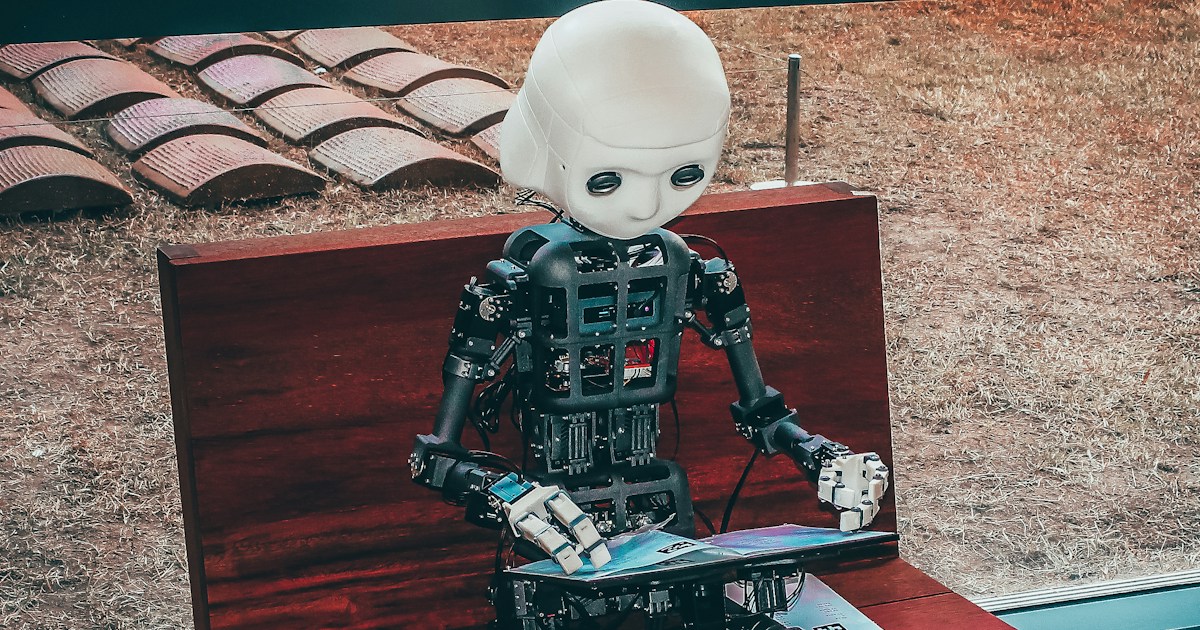
Robots existed long before modern machine learning. Early industrial robots were designed for controlled, repetitive tasks. As computing, sensors, and AI methods developed, robots gained better ways to interpret surroundings and handle variation.
| Era | Development | Why it mattered |
|---|---|---|
| Industrial automation era | Programmable robotic arms entered manufacturing | Robots could perform repeatable tasks in structured workplaces |
| Mobile robotics research | Researchers explored navigation and machine perception | Robots began moving beyond fixed work cells |
| Machine-learning era | Statistical models learned patterns from data | Perception and prediction improved for some tasks |
| Deep-learning era | Neural networks advanced image, speech, and language processing | Robots gained more capable perception tools |
| Modern AI robotics | Robotics increasingly combines learning models, planning, and real-time control | Robots can respond to more variation, although reliability remains task-dependent |
A useful historical perspective comes from the International Federation of Robotics, which documents how industrial robots are used across manufacturing. For the AI side, Stanford’s AI Index tracks developments in AI research, investment, and adoption.
The lesson from this history is not that robots have suddenly become universally intelligent. It’s that sensors, computing, models, and mechanical design have steadily improved together. A clever model cannot compensate for a weak gripper, and excellent hardware cannot make up for poor task planning.
How AI Robots Work
An AI robot is a team of components, not one magical brain. Hardware gathers information and moves the machine; software turns inputs into useful behavior. The quality of the whole system depends on how reliably those parts work together.
Sensors, Cameras, and Computer Vision
Robots use different sensors for different jobs. A camera can support object recognition; an encoder can measure wheel rotation; a force sensor can help a gripper detect contact. No single sensor tells the complete story.
| Sensor or system | Typical use | Common limitation |
|---|---|---|
| RGB camera | Object detection, visual inspection, navigation | Sensitive to lighting, glare, and oclusion |
| Depth camera | Estimating distance and object shape | Performance can vary with surface material and environment |
| LiDAR | Mapping and obstacle detection | Can be affected by reflective or unusual surfaces |
| Microphone array | Voice input and sound localization | Background noise can interfere |
| IMU | Measuring orientation and movement | Accumulated measurement error can build over time |
| Force or tactile sensor | Detecting contact or grip pressure | Requires careful calibration and mechanical integration |
| Wheel encoders | Estimating movement from wheel rotation | Slipping wheels can make estimates inaccurate |
Explore related topics through Robotic Coding™’s robotic sensors section. For a robot to behave safely, sensing needs to be paired with feedback and testing—not just added to a parts list.
Machine Learning, Neural Networks, and Large Language Models
Machine learning helps software detect patterns in data. A model might classify objects, estimate a person’s pose, or predict whether a package is likely to slip from a gripper. Neural networks are one family of machine-learning methods, and large language models (LLMs) can help interpret instructions or produce structured plans.
But language fluency is not the same as physical reliability. An LM can suggest a sequence of actions; a robot still needs software to check whether those actions are valid, safe, and possible for its hardware. High-level language understanding should not bypass low-level safety controls.
Robotics teams often combine:
- Perception models to identify objects and scenes.
- Localization and mapping to estimate position and build maps.
- Task planning to decide what should happen next.
- Motion planning and control to move safely.
- Safety checks to stop or reject actions outside allowed limits.
For the programming foundations behind these systems, see Robotic Coding™’s coding languages guides.
Robot Hardware, Actuators, and Control Systems
The robot’s physical body shapes what it can do. Wheels, joints, arms, grippers, motors, batteries, and structural parts all affect performance.
- Actuators create movement, often through electric motors or hydraulic systems.
- Controllers send commands to hardware and monitor feedback.
- Encoders report position or rotation.
- End effectors—such as grippers or tools—interact with objects.
- Emergency stops and protective systems help reduce risk.
A robot intended to sort lightweight objects has different mechanical requirements from one designed to move heavy equipment. Even a sophisticated AI model can fail if the robot’s gripper cannot hold an object securely or its joints cannot reach the target.
Cloud AI, Edge Computing, and Connectivity
Robots may process information locally, in the cloud, or through a mix of both.
| Approach | Strength | Trade-off |
|---|---|---|
| Edge computing | Fast response; can work with limited connectivity | Onboard computing and power are constrained |
| Cloud processing | Access to larger computing resources | Needs reliable connectivity and careful data handling |
| Hybrid computing | Balances local control with remote services | Adds system complexity and integration work |
For safety-critical movement, systems commonly need reliable local control even if a cloud service becomes unavailable. Network access can be useful for fleet management and updates, but a lost connection should not leave a robot behaving unpredictably.
Types of AI Robots
“AI robot” can mean a tiny programmable rover, a warehouse vehicle, a surgical support system, or a humanoid research platform. The shape often attracts attention, but the task, operating environment, and safety requirements are better guides to what a robot is for.
Humanoid Robots
Humanoid robots use a human-like body plan, often with a torso, arms, legs, or hands. Their shape may help them work with tools and environments designed for people, but bipedal movement and dexterous manipulation are challenging engineering problems.
Unitree’s G1 humanoid robot is one example of a research-oriented humanoid platform. RoboStore’s humanoid robot collection distinguishes between versions intended for demos, development, and more demanding dexterity needs.
The retailer describes its G1 Base as suitable for simple demonstrations and basic tasks, while the G1 EDU adds secondary-development support and a 100-TOPS NVIDIA Orin processor. Its G1 Ultimate is presented as an option for advanced hands, and the full-size H1s models target more demanding industrial use. Those are seller descriptions, so check the current manufacturer specifications, included hardware, and software access before deciding.
A useful rule: buy a humanoid because your project needs its form or research capabilities—not because a human-shaped robot looks more intelligent.
Industrial and Collaborative Robots
Industrial robots perform tasks such as welding, painting, assembly, and material handling. Collaborative robots, often called cobots, are designed to work in closer proximity to people under defined conditions.
Brands such as Universal Robots and ABB Robotics offer systems used industrial settings. A robot’s label alone does not make a cell safe: risk assessment, guarding, installation, programming, and training all matter.
Service, Delivery, and Hospitality Robots
Service robots may deliver food, carry supplies, guide visitors, clean floors, or support routine operations. Their performance depends heavily on the environment: a quiet hotel corridor is different from a crowded restaurant during a lunch rush.
Examples include Pudu Robotics service robots and Starship Technologies delivery robots. For buyers, useful questions include:
- Can the robot operate in the actual floor plan?
- How does it respond to people, pets, or temporary obstacles?
- What happens if a door is closed or an elevator is unavailable?
- How much human assistance does it need during a typical shift?
Home Robots and Smart Appliances
At home, AI features may appear in robot vacums, lawn mowers, companion devices, or smart appliances. Some products use computer vision or navigation algorithms; others mainly follow a mapped route or respond to app commands.
Brands such as iRobot and Roborock sell home-cleaning robots. Check what information a device collects, which features require an account, whether maps are stored locally or remotely, and how long software support is expected to continue.
For a small educational desktop project, M5Stack’s M5StackChan AI Desktop Robot Kit uses an ESP32-S3-based design. The manufacturer’s documentation is the right place to verify current hardware, software, and support details.
Healthcare and Assistive Robots
Healthcare robots include surgical systems, rehabilitation devices, logistics robots, and assistive technologies. They can support clinicians and patients, but medical use demands rigorous testing, oversight, and compliance with applicable rules.
The U.S. Food and Drug Administration’s medical-device resources provide information about medical device regulation. A robot marketed for a healthcare setting is not automatically appropriate for every patient or clinical task; use depends on intended purpose, evidence, training, and professional judgment.
Autonomous Mobile Robots, Drones, and Self-Driving Vehicles
Autonomous mobile robots (AMRs) move through environments using sensors and navigation software. Drones and self-driving vehicles apply related autonomy concepts, but each faces different safety, regulatory, and environmental challenges.
- AMRs may transport materials inside warehouses or hospitals.
- Drones can inspect infrastructure or support mapping.
- Autonomous vehicles combine perception, prediction, planning, and vehicle control.
The NIST robotics program provides resources related to robotics testing and performance. For simulation and virtual testing ideas, browse Robotic Coding™’s robotic simulations guides.
Where AI Robots Are Used
AI robots are most useful when a physical task benefits from a mix of repeatability and adaptation. That doesn’t mean every workplace needs one. The right choice depends on task frequency, variation, safety, total system complexity, and whether a robot can reliably outperform the existing process.
| Setting | Example task | Why a robot may help | Key concern |
|---|---|---|---|
| Factory | Inspection or material handling | Consistency and continuous operation | Safe integration with people |
| Warehouse | Moving stock or sorting parcels | Handling repetitive movement | Congestion and changing layouts |
| Hospital | Transporting supplies | Reducing routine travel for staff | Hygiene, privacy, and reliable operation |
| Farm | Monitoring crops or targeted treatment | Covering large areas with repeatable data collection | Outdoor conditions and maintenance |
| Classroom | Teaching programming and robotics | Hands-on exploration | Accessibility and age-appropriate safety |
| Home | Vacuuming or lawn maintenance | Automating routine chores | Privacy and performance in clutter |
Manufacturing, Warehousing, and Logistics
Factories use robots for structured tasks such as welding, packaging, assembly, and inspection. Warehouses may use mobile robots to move goods or support picking workflows.
AI can help systems identify variation—for example, different object shapes or product conditions—but dependable operation still relies on good process design. A robot that works well in a clean test area might struggle when labels are damaged, bins are shifted, or an unexpected object blocks its route.
The International Federation of Robotics tracks industrial robotics developments. Its reports help establish broader adoption trends, but a global statistic does not guarantee a particular robot will suit a specific facility.
Healthcare, Elder Care, and Rehabilitation
Robots in healthcare may carry supplies, assist with rehabilitation exercises, or support certain surgical procedures. They can help staff spend less time on repetitive movement, but they do not replace clinical judgment or personal care.
For patients and families, consider whether a system:
- Has a clearly defined clinical purpose.
- Is supervised by trained professionals.
- Protects health information.
- Has appropriate evidence and regulatory status.
- Offers a human alternative when the robot cannot help.
Agriculture, Construction, and Field Work
Outdoor robots face dirt, rain, uneven terrain, changing light, and other conditions that are much less predictable than a factory floor. Agricultural systems may monitor crops, target weeds, or gather field data. Construction robots may help with inspection, surveying, or repetitive site operations.
A field robot’s headline capability is only half the story. Service access, weather tolerance, battery life, and recovery from failure can determine whether it is genuinely useful.
Education, Research, and Entertainment
Robotics kits give students practical ways to connect software, electronics, and physical systems. Researchers can use robots to test ideas in perception, navigation, manipulation, or human-robot interaction.
Educational systems from brands such as LEGO Education and VEX Robotics can support structured learning. Choose based on age range, curriculum, parts availability, documentation, and whether students can modify the code—not on a shiny demo alone.
Homes, Retail, and Public Spaces
In public spaces, robots may clean floors, guide visitors, deliver items, or gather operational data. In homes, they often handle a narrow chore such as vacuuming or lawn care.
The biggest surprise for many first-time users isn’t the robot’s intelligence—it’s how much the environment affects it. A chair moved a few inches, a rug edge, or a charging cable can change the robot’s performance. If you’re shopping, test the device against your real floor plan and routine.
What AI Robots Can—and Can’t—Do
AI robots can perform specific tasks with impressive speed or consistency, especially when their environment is understood and their operating limits are clear. They can also fail in ways that look surprising because the machine has no human common sense to fill in missing context.
Strengths: Precision, Adaptation, and Repetitive Tasks
A well-designed robot can:
- Repeat movements consistently.
- Operate in environments that are hazardous or physically demanding.
- Process sensor data quickly.
- Work for extended periods with planned maintenance.
- Adapt to certain variations using AI models.
These strengths are task-specific. An AI-enabled inspection system might find defects in a defined product range, but that does not mean it can inspect every object or explain every unusual result.
Limitations: Judgment, Dexterity, and Unexpected Situations
Robots often struggle when conditions differ from training or testing. Common challenges include:
- Unfamiliar objects or environments
- Poor lighting, noise, or sensor obstruction
- Fragile, deformable, or tangled materials
- Ambiguous instructions
- Unexpected human behavior
- Limited battery, computing, or network capacity
AI models can also produce incorrect or overconfident outputs. Keep a human review path for decisions that affect people, health, safety, or significant resources.
How to Choose an AI Robot
Start with the problem, not the product category. Ask what task the robot should perform, where it will operate, who will supervise it, and what success looks like. A small, well-documented rover may be a better learning tool than an expensive humanoid platform; a fixed industrial arm may outperform a mobile robot in a stable work cell.
Match the Robot to Your Task
Write down the job in plain language:
- Define the task. What needs to happen, and how often?
- Describe the environment. Indors or outdoors? Structured or crowded? Are people nearby?
- Set success criteria. How will you measure accuracy, safety, reliability, or time saved?
- List failure cases. What should happen if the robot gets stuck, loses connection, or misidentifies an object?
- Compare alternatives. Could a simpler automated system solve the problem more safely?
Compare Autonomy, Sensors, and AI Capabilities
Ask sellers or manufacturers for specific, verifiable answers:
| Check | What to verify |
|---|---|
| Autonomy | Which actions are genuinely autonomous, and which require a human operator? |
| Sensors | What sensors are included, and what conditions affect them? |
| AI capabilities | Are features performed on-device, in the cloud, or both? |
| Development access | Can you modify code, install tools, or connect external systems? |
| Safety | What safeguards, operating limits, and emergency controls are provided? |
| Support | Are documentation, updates, spare parts, and technical support available? |
| Data | What is collected, where is it processed, and how can you delete it? |
For humanoids, the distinction between models can be significant. The RoboStore descriptions of G1 Base, G1 EDU, and G1 Ultimate emphasize different levels of development access and hand capability. Treat those as purchasing claims to verify against the manufacturer’s current documentation and your project’s exact requirements.
Check Safety, Privacy, Support, and Compatibility
Before purchasing or deploying a robot, check:
- Physical safety: movement limits, emergency stops, operating environment, and risk assessment.
- Privacy: camera and microphone permissions, cloud processing, account requirements, and data retention.
- Security: update policy, password controls, network requirements, and vulnerability reporting.
- Compatibility: programming tools, operating systems, APIs, accessories, and integration needs.
- Maintainability: repair options, spare parts, battery replacement, and long-term software support.
Questions to Ask Before You Buy or Deploy
- Can the robot do the task in my actual environment?
- What does it do when it cannot recognize something?
- Can I stop it quickly and safely?
- Which features require an internet connection?
- Can I access the sensors or modify the software?
- What support and documentation are included?
- Are performance claims backed by independent testing or clear specifications?
- What training will operators need?
Building and Programming an AI Robot
Building a robot is a satisfying way to learn how code interacts with the physical world—but it rewards small, testable steps. Our engineers usually begin with movement and sensor readings before adding AI. That makes debugging much easier: if the robot vers left, you want to know whether the problem is a motor, a sensor, or the model.
Beginner-Friendly Robotics Kits and Platforms
| Platform | Good fit for | Check before choosing |
|---|---|---|
| LEGO Education SPIKE | Classroom projects and block-based learning | Curriculum fit and coding progression |
| VEX Robotics | Structured robotics education and competition | Age range, parts ecosystem, and programming support |
| Arduino | Electronics, sensors, and basic control | Board compatibility and hardware limits |
| Raspberry Pi | Linux-based projects and camera or AI experiments | Power needs and real-time control requirements |
| M5Stack | Compact ESP32-based prototypes and connected devices | Documentation, expansion modules, and supported software |
| Unitree G1 EDU | Advanced humanoid research and development | Cost of ownership, access, safety, and development requirements |
Start with a platform you can understand and repair. If the project requires a camera, local computing, or custom code, confirm that the platform exposes those functions rather than assuming they are available.
Popular Tools: ROS, Python, Arduino, and Raspberry Pi
- ROS 2: A robotics software framework for communication between components, tools, and packages. See the official ROS 2 documentation.
- Python: Popular for protyping, scripting, and working with AI libraries.
- C and C++: Common in embedded and performance-sensitive systems.
- Arduino: A platform and ecosystem used for microcontroller projects. See Arduino’s official documentation.
- Raspberry Pi: A compact computer used in many educational and prototype projects. See the Raspberry Pi documentation.
Beginners often ask which language is “best.” The honest answer is the one supported by your robot and suitable for the job. A project can use Python for high-level logic and C++ or microcontroller code for responsive hardware control.
A Simple AI Robotics Project Workflow
Here’s a practical sequence for a small object-detection rover:
- Choose one measurable task. For example, detect a brightly colored marker and stop before reaching it.
- Check the hardware. Confirm the motors, power supply, camera, and controller are compatible.
- Make the robot move manually. Test forward, reverse, turning, and stopping before adding AI.
- Read the sensors. Display camera frames or sensor values and check them under different lighting.
- Add a basic rule. Use a simple threshold or detector to recognize the target.
- Connect perception to control. Translate the detection into an action, with a safe stopping condition.
- Test edge cases. Try shadows, partial obstruction, different distances, and an empty scene.
- Log failures. Record when the system acts incorrectly and what the sensors reported.
- Improve one component at a time. Change the lighting, model, control settings, or hardware separately.
- Add safety behavior. Include a manual stop and define what happens when the camera or software fails.
That sequence may not sound glamorous, but it keeps the robot from becoming an expensive little mystery box.
AI Robot Safety, Privacy, and Security
A robot that moves, records, connects to a network, or makes recommendations can create real risks. Responsible development treats safety, privacy, and security as design requirements from the beginning—not as paperwork to tack on later.
Physical Safety and Human-Robot Collaboration
Before operating a robot near people:
- Identify hazards such as pinch points, sharp tools, falling objects, or unexpected movement.
- Set operating limits and access controls.
- Test emergency stops and safe shutdown behavior.
- Train users and supervisors.
- Reassess risk after changing software, tools, payloads, or workspace layout.
The Occupational Safety and Health Administration (OSHA) provides workplace robotics safety information. For collaborative systems, the correct safeguards depend on the application and installation; a “collaborative” label does not mean “safe under every condition.”
Cameras, Microphones, and Personal Data
A robot may capture faces, voices, rooms, routines, or location information. Before enabling recording or cloud features, find out:
- What data is collected.
- Whether it is processed locally or uploaded.
- How long it is retained.
- Who can access it.
- Whether you can delete it or disable collection.
- What notice and consent are required in your setting.
A robot vacuum mapping a living room and a workplace robot recording a production line raise different privacy questions, but both deserve clear data practices.
Cybersecurity and Responsible Updates
Connected robots are computers with moving parts. Use strong unique passwords, install trusted software updates, restrict unnecessary network access, and avoid exposing control interfaces to the public internet.
NIST’s Cybersecurity Framework offers risk-management guidance that organizations can adapt. For developers, secure update channels and careful access controls should be designed into the system—not left to the end user to discover.
Ethics, Jobs, and the Future of AI Robotics
AI robotics can improve productivity and support people, but it can also shift work, concentrate control, or create new risks. A balanced view asks not only what the robot can do, but who benefits, who is affected, and who is accountable when it fails.
How Robots May Change Work
Robots can take on repetitive, physically demanding, or hazardous tasks. They can also change the skills employers need, create maintenance and programming roles, and alter how teams divide work.
The effect depends on the setting. Some jobs may be redesigned rather than simply removed; some tasks may be automated while others remain human-led. Good deployment involves worker input, training, transition planning, and transparent decisions about monitoring and performance.
Bias, Accountability, and Human Oversight
AI systems can reflect limitations in their training data and testing. If a robot works with people, poor perception or biased assumptions can affect who receives service, who is recognized, or who is treated as an obstacle.
Practical safeguards include:
- Testing across diverse people and environments.
- Documenting system limits.
- Keeping human review for consequential decisions.
- Providing clear ways to report problems.
- Assigning responsibility for maintenance and updates.
The Human Factors and Ergonomics Society’s Human–AI–Robot Teaming group emphasizes multidisciplinary work on the design, development, implementation, and evaluation of human–AI–robot teams. Its focus is a useful reminder that effective robot systems are built around people and tasks, not just hardware and software.
The featured video’s perspective, available at #featured-video, raises concerns about powerful AI systems, accountability, privacy, and the possibility of AI agents behaving in unexpected ways. Those are important topics, but dramatic predictions should be separated from demonstrated evidence. For an AI robot in a real workplace or home, the most actionable questions are concrete: What can it access? What can it control? How is it tested? Who can intervene?
What’s Next for Humanoid and Autonomous Robots?
Robotics research continues to explore improved manipulation, navigation, human-robot interaction, and the use of AI models for complex tasks. Humanoid robots attract attention because their shape resembles ours, but practical deployment depends on reliability, safe operation, maintainability, and a clear reason to use a humanoid design.
Expect progress to be uneven. A robot may perform impressively in a controlled demonstration while still needing human support in ordinary environments. Look for independent testing, clearly described operating limits, and evidence from repeated use—not just viral clips.
AI Robot Maintenance and Troubleshooting
Regular maintenance helps prevent small issues from becoming mysterious failures. Keep the manufacturer’s documentation nearby and record changes to hardware, software, and settings.
| Symptom | Possible cause | First check |
|---|---|---|
| Robot drifts or vers | Wheel slip, uneven surface, motor imbalance | Inspect wheels and compare encoder readings |
| Camera misses objects | Lighting, lens obstruction, focus, model limitations | Clean lens and test under consistent lighting |
| Gripper drops objects | Poor grip, wrong force setting, object variation | Check finger surfaces and grip feedback |
| Robot stops unexpectedly | Battery, safety limit, sensor fault, or software error | Review logs and safety status |
| Navigation becomes unreliable | Changed layout, blocked sensor, stale map | Clear sensors and update or rebuild the map |
| Network features fail | Connectivity, authentication, or service outage | Test local functions and verify account settings |
A sensible maintenance routine includes:
- Inspecting cables, fasteners, wheels, joints, and grippers.
- Cleaning lenses and sensors according to manufacturer guidance.
- Checking batteries for damage and following safe charging instructions.
- Reviewing logs after unusual behavior.
- Updating software only through trusted sources.
- Retesting safety functions after repairs or configuration changes.
AI Robot Quick Tips
- ✅ Define the task before choosing a robot.
- ✅ Check whether AI runs locally, in the cloud, or both.
- ✅ Treat vendor performance claims as claims to verify.
- ✅ Test with your actual workspace, users, lighting, and objects.
- ✅ Keep an emergency stop and human override where appropriate.
- ✅ Review camera, microphone, and data-retention settings.
- ✅ For learning projects, begin with sensors and basic control before adding machine learning.
- ❌ Don’t assume a humanoid robot is automatically more capable.
- ❌ Don’t confuse a polished demonstration with reliable everyday performance.
- ❌ Don’t let a language model bypass hardware safety limits.
- ❌ Don’t ignore maintenance, training, software support, or connectivity requirements.
One last useful test: if you can’t explain what the robot should do when it is confused, blocked, or disconnected, the project isn’t ready for unsupervised operation.